
Download Keyden – SSH Key Management, Secure Authentication, Biometric Login, Password Manager Integration, Key Gatekeeper
Overview
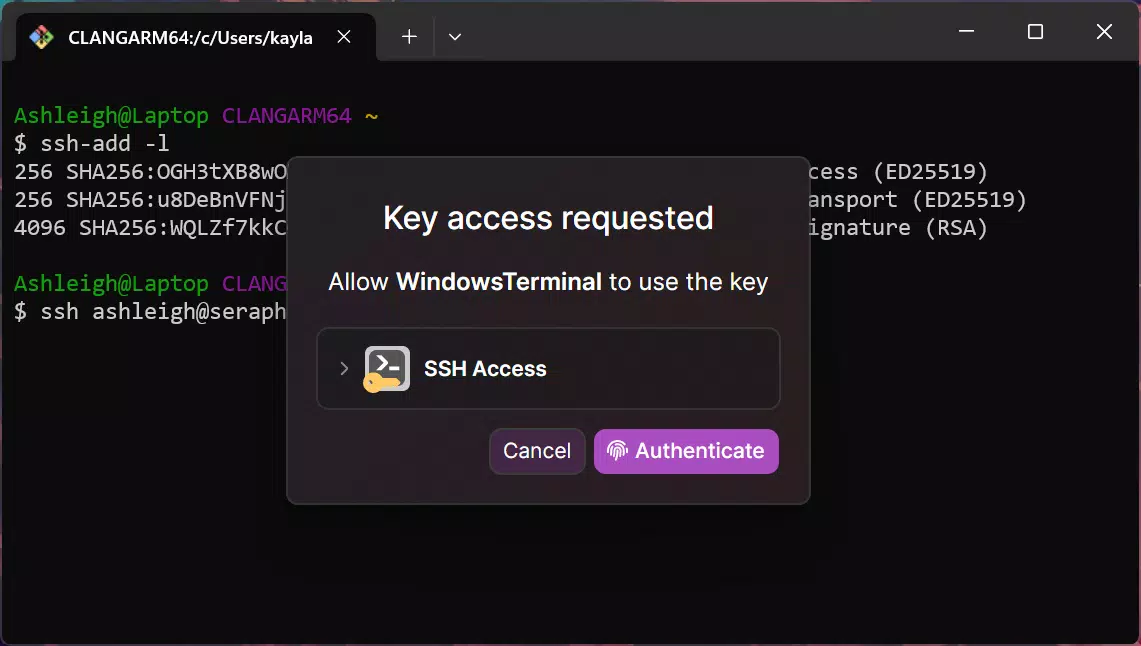
Keyden is a specialized mobile application developed to strengthen the security of SSH key management for users who rely on secure remote access to systems. Designed as a key gatekeeper, the app ensures that only authorized SSH keys can gain access to protected environments, reducing the risk of unauthorized intrusions. It is particularly suited for developers, system administrators, and IT professionals who manage multiple servers and demand high levels of access control. By integrating biometric authentication, Keyden adds a critical layer of identity verification, ensuring that even if a key is compromised, it cannot be used without physical verification from the authorized user.
The app’s focus on secure authentication aligns with modern cybersecurity practices, especially in environments where data integrity and system availability are paramount. Its ability to work in conjunction with existing password managers streamlines the workflow for users who already maintain centralized credentials. This integration enhances both convenience and security by allowing users to manage SSH keys alongside other sensitive data in a unified, protected space. Keyden does not aim to replace traditional key management tools but rather serves as a mobile enforcement layer, providing on-the-go access control.
Although the developer did not provide additional technical details about the app’s architecture or backend infrastructure, the core functionality suggests a secure, lightweight solution built for real-world deployment. The release on April 10, 2024, marks its entry into a growing ecosystem of mobile security tools, offering a niche yet vital service for users prioritizing SSH security in their daily workflows.
Key Features & Functionality
- Biometric Authentication: Keyden requires biometric verification—such as fingerprint or facial recognition—before allowing access to stored SSH keys. This ensures that only the authorized user can activate a key, even if the device is lost or stolen.
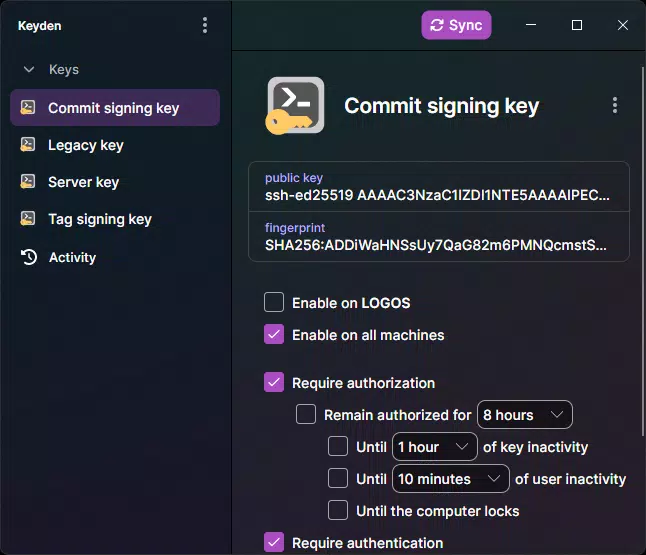
- SSH Key Gatekeeper: The app acts as a centralized gatekeeper, enforcing access policies for SSH keys. Users can define when and how keys are permitted to be used, adding a dynamic layer of control over remote access.
- Password Manager Integration: Keyden seamlessly connects with popular password managers, enabling users to store and manage SSH keys alongside other credentials in a single, secure vault. This reduces the risk of misplacing or misconfiguring keys.
- Customizable Authorization Rules: Users can set specific conditions for key usage, such as time-based access, location restrictions, or device-specific permissions. This flexibility supports diverse security policies across teams or personal projects.
- User-Friendly Interface: Despite its advanced security features, Keyden maintains an intuitive design that simplifies navigation and key management. The interface is accessible to both experienced users and those new to SSH key handling.
For example, a system administrator can configure a rule that allows a specific SSH key to be used only during business hours and only from a trusted network. If an attempt is made outside these parameters, the key is blocked—even if the key file is present. This functionality is particularly useful in environments where compliance and audit trails are essential.
Interface, UX & Performance
Keyden features a clean, minimalist interface that prioritizes clarity and ease of access. The layout is organized around core functions: key listing, authentication prompts, and rule configuration. Navigation is linear and consistent, minimizing user confusion during critical operations. The visual design avoids clutter, using clear icons and logical grouping to guide users through each step.
Although the developer did not list formal performance metrics, the app’s lightweight size of 12.3 MB suggests efficient resource usage. It is designed to run smoothly on a range of Android devices, from mid-tier to high-end models. The responsiveness of the interface indicates optimized code handling, particularly during biometric verification and rule updates.
Stability appears to be a priority, with no reported issues in the initial release. The app maintains consistent behavior during repeated authentication attempts and rule modifications. Users can expect reliable performance across different usage scenarios, including frequent key access and policy changes. However, specific performance benchmarks were not disclosed.
Platform Compatibility & Technical Requirements
Keyden is available exclusively on the Android platform. The current version is 1.0.1, released on April 10, 2024. The app has a file size of 12.3 MB, making it suitable for devices with limited storage space. The developer did not specify minimum OS requirements, nor did they list compatibility details for specific Android versions or device types.
Given its focus on biometric authentication, the app likely requires devices with built-in fingerprint sensors or facial recognition capabilities. However, this was not confirmed in the provided information. Users should ensure their device supports biometric features to fully utilize Keyden’s core functionality. The app is currently free to download and install, with no in-app purchases or subscription fees.
Pros and Cons
Pros
- Enhances SSH key security with biometric authentication
- Seamless integration with password managers
- Supports customizable access rules for fine-grained control
- Lightweight design at just 12.3 MB
- Intuitive interface suitable for non-experts
Cons
- Platform availability limited to Android
- Specific OS version requirements not disclosed
- Biometric functionality dependent on device hardware
- No information on cloud sync or backup features
- Developer did not provide detailed technical documentation
FAQ
Is Keyden safe to use on my Android device?
Yes, Keyden is designed with security as a core principle. It uses biometric authentication and secure storage to protect SSH keys. The app does not transmit keys over the internet, reducing exposure to external threats.
Can I use Keyden with my existing password manager?
Yes, Keyden integrates with popular password managers, allowing you to manage SSH keys alongside other credentials in a centralized, secure location.
Do I need a specific Android version to install Keyden?
The developer did not specify minimum OS requirements. It is recommended to use a recent Android version to ensure compatibility with biometric features.
Is Keyden available for iOS devices?
Currently, Keyden is only available for Android. There is no official iOS version announced at this time.
How often should I update Keyden?
It is recommended to keep the app updated to the latest version to ensure security patches and new features are applied. Updates are free and available through the official app store.
Final Thoughts
Keyden delivers a focused, high-value solution for users who demand robust SSH key security on mobile devices. Its combination of biometric authentication, customizable authorization rules, and password manager integration sets it apart in a niche but growing market. The app is ideal for developers, IT professionals, and security-conscious individuals who manage multiple systems and require a reliable, on-the-go access control tool.
While the app’s platform exclusivity to Android and lack of detailed technical documentation are limitations, its lightweight footprint, intuitive design, and strong security foundation make it a compelling choice. For users seeking a secure, mobile-first approach to SSH key management, Keyden offers a practical and trustworthy solution.
Download Keyden now


